
The scope changes.
The crew plan doesn’t.
An updated requirement lives in a quote or email while the crew works from yesterday’s instructions.
Keep scope with the work →OPERATIONS SOFTWARE FOR TELECOM CONTRACTORS
Connect scope, schedules, crews, materials, field work, and closeout. See what’s ready, what’s blocked, and what needs to happen next.

Confirm kit receipt. Review the crew’s plan.
THE GAPS BETWEEN THE TOOLS
An updated requirement lives in a quote or email while the crew works from yesterday’s instructions.
Keep scope with the work →The missing kit comes to light when people are already committed, and someone has to piece together the alternatives.
See a readiness decision →The office is chasing a photo or test result while the client is waiting for documentation they can accept.
Connect evidence to handoff →ONE PROJECT / EVERY HANDOFF
Cedar Ridge is a fictional three-sector antenna modernization. Follow Crew 04 from the agreed scope to the evidence needed for acceptance.
01 / Quote & scope
Carry the agreed scope and client requirements into the work. Keep the original commitment in view when details change.
Confirm the awarded scope before committing a crew.
A shared starting point for planning.
02 / Plan the work
Connect activities, dependencies, crew assignments, and evidence requirements. A date on a schedule has a reason behind it.
Assign Crew 04 and sequence the work around site access.
A crew commitment with its requirements attached.
03 / Check readiness
Check the people, qualifications, materials, equipment, access, and approvals needed for the selected work on its planned date.
Verify delivery of six grounding kits. A vendor promise is not a site receipt.
Grounding is blocked. Other work can still be reviewed.
04 / Record the day
Capture progress, Daily Field Reports, Job Hazard Assessments, and photos against the site and work they describe. Give the office context for review.
Record antenna replacement and cable labeling as complete; keep grounding open.
Recorded progress, with evidence the office can inspect.
05 / Respond & replan
See what changed, who needs to respond, and which commitments are affected. Compare choices and keep the human decision with the revised plan.
Move grounding to Day 2, subject to confirmed kit receipt and a fresh readiness check.
A revised commitment, not an assumption that the problem is solved.
06 / Review & close out
Connect the agreed requirements to photos, reports, tests, and review. See the gaps before preparing the client handoff, and keep acceptance distinct from completion.
Hold the final handoff until grounding evidence is recorded and reviewed.
A clear view of what still stands between work and acceptance.
One project. Connected decisions at every stage.
Explore the full product →WHEN THE PLAN MEETS THE SITE
See why the connections matter. Choose how the planner responds to a material delay.
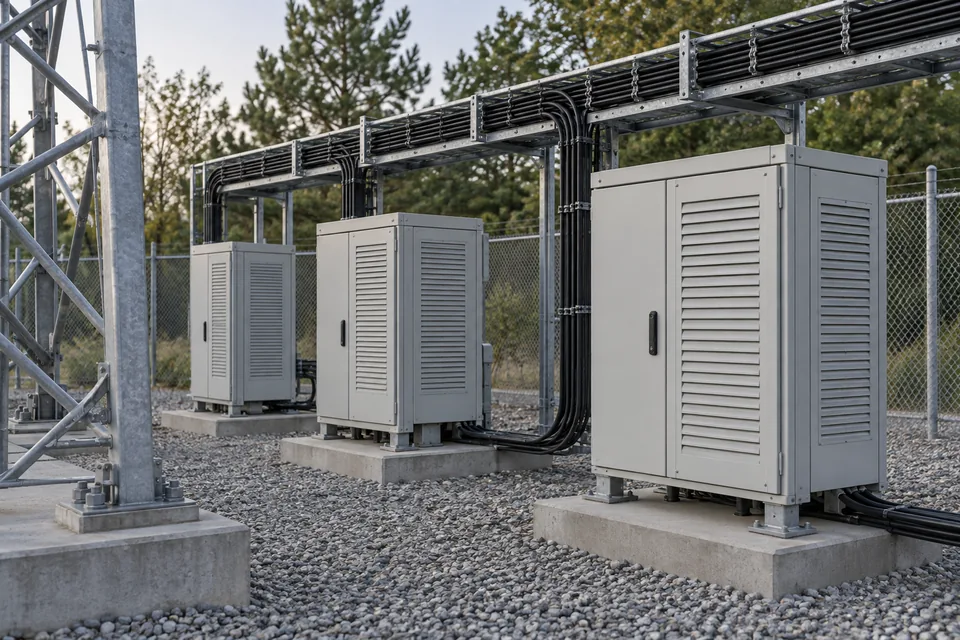
Six kits are required. None are recorded on site. Grounding cannot start, but the entire job isn’t blocked.
● Grounding blocked
YOUR CALL / TWO POSSIBLE RESPONSES
Two possible human responses are shown below.
Antenna replacement and cable labeling have the required people, access, equipment, and materials. The planner chooses those activities for Day 1.
This is the Day 1 decision shown in the sample report.
The planner changes the grounding commitment. The new date depends on confirmed kit receipt and another readiness check; changing a date does not clear the blocker.
After execution, grounding photos and test results still need review.
SHARED CONTEXT / DIFFERENT RESPONSIBILITIES

Understand which jobs need attention, what is blocked, and who owns the next response.
Keep scope, dependencies, readiness, and crew commitments connected as conditions change.
Give the crew a shared context for the day. Capture progress, blockers, reports, and photos where they belong.
Find the evidence, identify corrections, and prepare client documentation with outstanding requirements in view.
SOMETHING YOU CAN INSPECT
A Daily Field Report gives the office a clear account of what happened, what is still blocked, and what comes next.
This fictional Cedar Ridge report uses SitePulse’s document format. Open it, read it, download it. No form required.
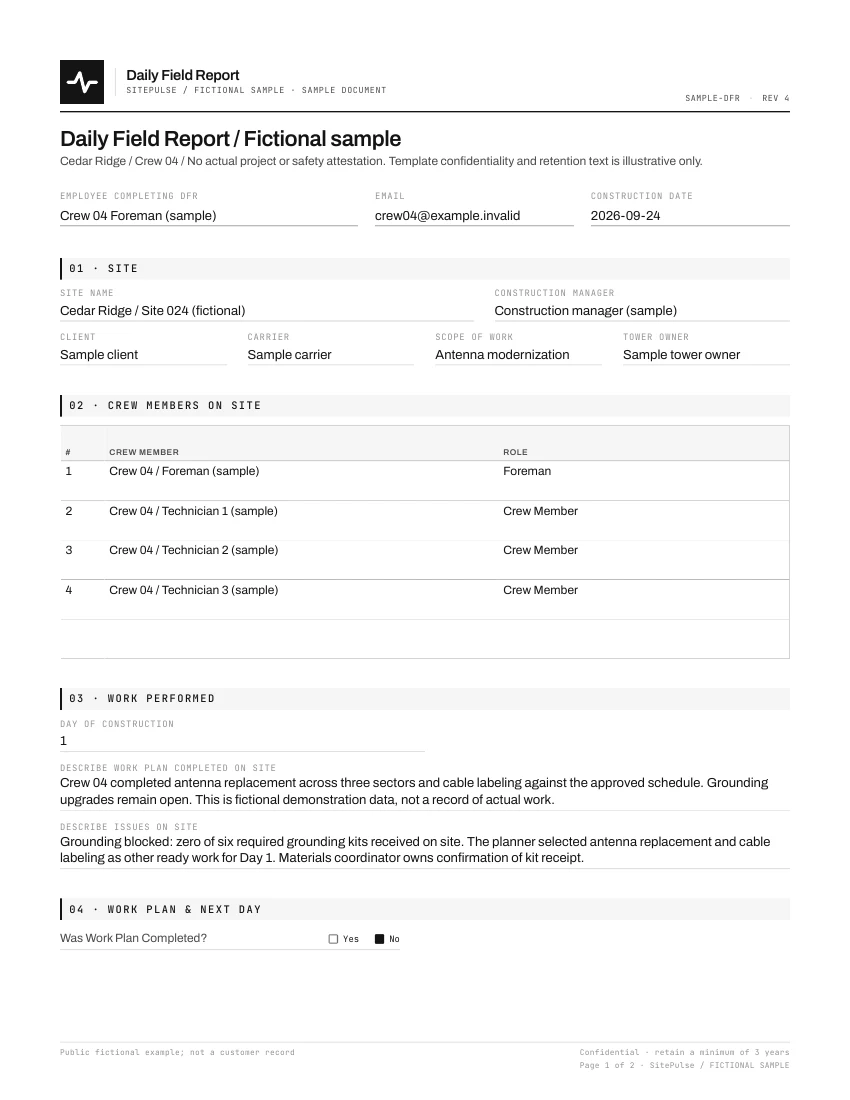 Actual document format · Fictional project data ↗
GETTING STARTED
A useful rollout connects the people in the field with the people planning and reviewing their work.
Bring your scope, client requirements, reports, and the handoffs that need attention.
Agree supported configuration, responsibilities, and the initial crew and office reviewers.
Work through the field and office flow together. Review what needs adjusting before expanding.
PRACTICAL QUESTIONS
Telecom contractors coordinating multiple crews, construction managers, and office reviewers. SitePulse connects the scope you commit to with the work, people, materials, and evidence needed to deliver it.
Yes. The Field experience is designed for phones, with an Office experience for planning and review on a larger screen. Review your actual devices and browser requirements with us during setup.
Plan on connectivity for setup, access to current work, and submission. Do not assume every task can start or be completed offline. We will review your field conditions and the supported connection-dependent steps in the demo.
Bring a sample of the reports, photos, test results, and handoff requirements your clients expect. We will review supported configuration and identify gaps. Downloaded documents can be delivered through your existing process; client portals and acceptance rules still apply.
Start with a workflow review, supported configuration, and an initial project and crew. Plan training for both field and office users. Contact SitePulse through the inquiry form for setup or support questions; timing and service scope are agreed with your team.
Reports and selected document packages can be downloaded for your client handoff. For other data access, retention, or migration needs, tell us what you need so we can confirm the scope before you commit.
We walk through scope, planning, readiness, field reporting, and client handoff using your workflow as the guide. Tell us where work gets disconnected today. We will discuss fit, setup, and commercial terms directly; submitting the form does not subscribe you to a mailing list.
LET’S CONNECT THE WORK
Show us where the handoffs get difficult. See how SitePulse connects scope, readiness, field work, and closeout.
No mailing-list signup. No commitment to buy.
INQUIRY RECEIVED
The SitePulse team will follow up about your inquiry.
Explore SitePulse →